How scam emails bypass spam filters: Stay safe
Your spam filter catches most junk mail, so you’re protected, right? Not quite. Understanding how scam emails bypass spam filters is one of the most useful things you can do for your online safety right now. Scammers are not sitting still. They study how filters work, find the gaps, and exploit them with techniques that are increasingly hard to spot. This article breaks down exactly how they do it, what the newer threats look like, and what you can do to protect yourself beyond relying on your inbox’s built-in defenses.
Table of Contents
- How spam filters work and their limits
- Common techniques scammers use to evade filters
- Emerging phishing tactics that outsmart traditional filters
- How AI and language models improve spam detection, and why scammers adapt
- Practical steps to protect yourself from scam emails that bypass filters
- Why understanding how scam emails bypass filters is your best defense
- Protect your inbox with ScamKit’s free multi-source scam detection tools
- Frequently asked questions
Key Takeaways
| Point | Details |
|---|---|
| Scammers use tech tricks | They hide malicious content inside QR codes, invisible characters, and trusted sites to evade filters. |
| Filters analyze multiple signals | Modern filters use AI to check headers, content, sender behavior, and context, but are not foolproof. |
| User vigilance is vital | Combining filters with careful scrutiny and verification best protects you from scams. |
| Allowlisting has risks | Marking senders as trusted can backfire if those accounts are compromised by attackers. |
| Use verification tools | Free tools like ScamKit help you check suspicious links and emails before interacting. |
How spam filters work and their limits
To grasp how scam emails slip through, first understand how spam filters work and where they fall short.
Most people picture spam filters as a simple keyword check. “Free money” in the subject line? Blocked. Reality is far more layered than that. A modern enterprise spam filter evaluates emails through layers including authentication verification, content analysis, URL detonation, sandboxing, and sender behavior baselines. Each layer adds protection, but each also has weaknesses a determined scammer can exploit.
Here is what a typical filter checks when an email arrives:
- IP reputation: Is the sending server known for spam activity?
- Authentication protocols: Does the email pass SPF, DKIM, and DMARC checks? These verify that the sender is who they claim to be.
- Content analysis: Are there suspicious words, phrases, or patterns in the body or subject line?
- URL scanning: Are any links in the email pointing to known malicious sites?
- Attachment sandboxing: Does any attached file behave suspiciously when opened in a controlled test environment?
Authentication protocols like SPF, DKIM, and DMARC have significantly reduced basic spoofing, where scammers fake a sender address. But passing authentication does not mean an email is safe. A scammer can send from a legitimately registered domain, pass every authentication check, and still deliver a phishing message.
Content-based filters also have limits. They are trained on known scam patterns. A brand-new scam that does not match any existing signature can sail right through. And because filters balance catching spam with letting legitimate email through, they are deliberately tuned to avoid blocking too much. That caution creates an opening.
To learn how to detect email scams once they reach your inbox, the habit of manual verification matters as much as any filter.
Common techniques scammers use to evade filters
With the basics of spam filtering clear, let’s examine how scammers cleverly exploit filter weaknesses using advanced techniques.
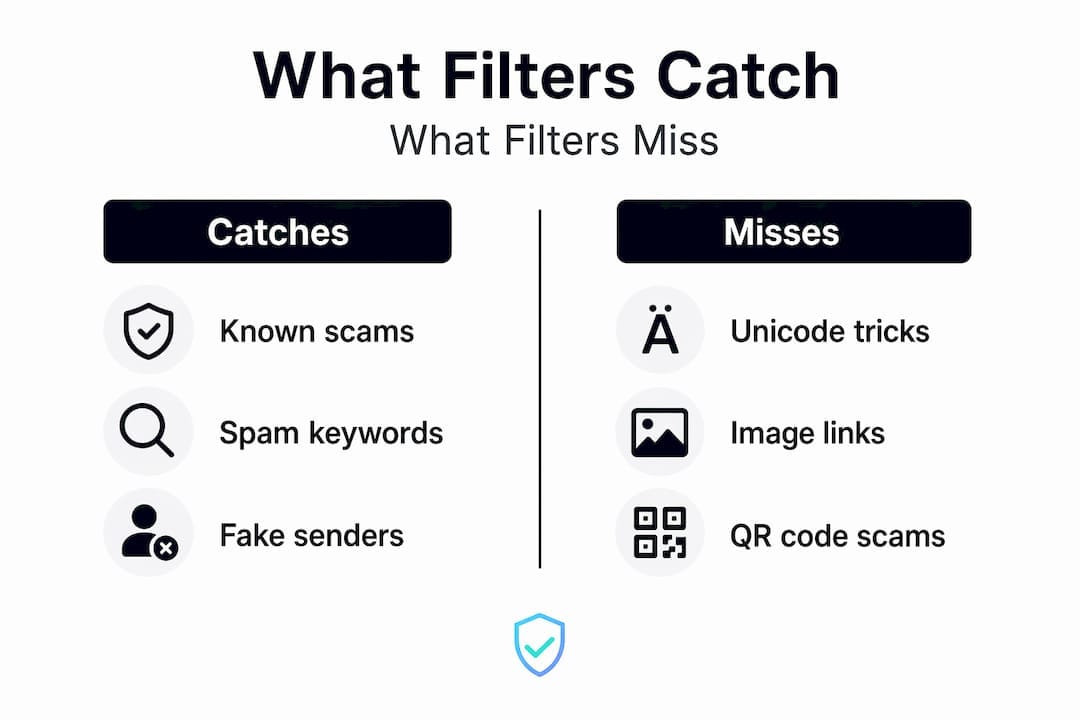
Some of these methods are genuinely surprising. You would not expect a scammer to use invisible characters, but that is exactly what is happening. Attackers use invisible Unicode characters to split suspicious keywords, evading keyword-based filtering, and append benign content and legitimate links to confuse AI-based NLP (natural language processing) filters.
Here is what that looks like in practice. Imagine the word “credit” embedded in a scam email. By inserting invisible Unicode tag characters between the letters, the word becomes unreadable to the filter at the byte level, while appearing perfectly normal to your eyes. The filter sees gibberish. You see a convincing sentence about your credit account.

Another growing method is noise injection. Appending large amounts of benign text and legitimate links separated by many HTML break lines is used to skew AI detection into false negatives. The scammer buries one malicious link inside an email that looks, to the filter’s AI brain, like a normal newsletter with lots of helpful content and reputable references.
A third technique involves borrowing the good reputation of trusted platforms. Modern phishing increasingly uses trusted cloud platforms to host malicious payloads, bypassing reputation checks as links appear safe. A link pointing to a well-known file sharing or collaboration service will not trigger a reputation block, even if the file or page waiting at the other end is malicious.
Here is a comparison of how traditional filtering stacks up against these advanced evasion tactics:
| Filter method | What it catches | What it misses |
|---|---|---|
| Keyword matching | Known scam phrases | Unicode-obfuscated keywords |
| IP reputation check | Known spam servers | Emails from new or clean domains |
| URL reputation scan | Known malicious links | Links hosted on trusted platforms |
| AI content analysis | Suspicious language patterns | Noise-injected emails with benign filler |
| Authentication (SPF/DKIM/DMARC) | Spoofed sender addresses | Emails from legitimately registered scam domains |
Pro Tip: If an email feels off but looks clean, that feeling deserves attention. Scammers engineer emails to pass technical checks while still triggering your instincts. Trust both the tools and your gut, and avoid common scam techniques by knowing what to look for.
You can also find useful context on QR code email scanning challenges to understand the broader picture.
Emerging phishing tactics that outsmart traditional filters
Beyond traditional tricks, scammers now exploit new technologies and trusted platforms to outmaneuver email filters.
One of the fastest-growing spam filter bypass methods is QR code phishing, sometimes called “quishing.” QR code phishing bypasses filters because the QR code hides the destination URL, which is revealed only when scanned by a mobile device outside corporate protections. Your email filter scans text and links. It cannot read the destination buried inside a QR code image.
The scam works like this. You receive an email that looks like a shipping notification or an invoice. It contains a QR code instead of a clickable link. Your work or personal email filter sees an image, nothing suspicious. You scan the code on your phone, which sits outside any corporate security layer, and land on a convincing fake login page designed to steal your credentials.
A separate but equally clever technique involves abusing legitimate platforms. Attackers bypass SPF, DKIM, DMARC by inserting phishing in profile fields on trusted platforms, making the email appear legitimate and pass all authentication checks. A notification email from a real, legitimate service can contain a malicious message in a profile or comment field that the attacker controls. The email is real. The authentication is real. The threat is real too.
Here is what to watch for with these newer attacks:
- QR codes in unexpected emails, especially those asking you to verify an account or claim a prize
- Notification emails from known services that contain urgent or unusual messages in the body
- Emails encouraging you to move a conversation to a different platform
- Links or codes embedded in PDF attachments, since PDFs also bypass many URL scanners
Pro Tip: Treat every QR code in an email the same way you would treat a raw URL. Before you scan it, ask yourself whether you were expecting it and whether the sender is someone you know and trust. For a deeper look at this threat, visit our guide on QR code phishing tactics.
How AI and language models improve spam detection, and why scammers adapt
While AI powers smarter filters, scammers adapt using sophisticated language and behavior mimicry, making detection challenging.
Modern spam detection now uses Large Language Models, or LLMs. These are the same type of AI technology behind many chatbots, and they are far more capable than older rule-based filters. Modern spam detection uses LLMs analyzing headers, content patterns, sender behavior, and contextual relevance, adapting better than static rules to new attack methods.
LLMs do not just look for bad words. They evaluate signals like:
- Whether the urgency of the message matches the sender’s usual communication style
- Whether a link in the email matches the domain of the supposed sender
- Whether the email was sent at an unusual time for that sender’s history
- Whether the tone and topic are consistent with past emails from the same address
This contextual awareness catches phishing emails that slip past keyword filters. A message that says “Urgent: your account will be suspended” from a sender who has never contacted you before raises red flags for an LLM, even if every individual word looks innocent.
Here is how a well-designed LLM spam detection system works in practice:
- Batch analysis: The system reviews emails in groups, comparing them to known patterns and each other.
- Signal weighting: It assigns risk scores to signals like mismatched URLs, unusual sender timing, and atypical phrasing.
- Context checking: It evaluates whether the email’s topic makes sense given your history with that sender.
- Edge case review: Borderline emails get flagged for additional scrutiny or human review.
Scammers counter by using AI tools of their own. They generate emails that sound natural, use varied phrasing to avoid pattern detection, and inject noise to dilute the suspicious signals. It is a genuine arms race. For more on how phishing sender behavior analysis works, the examples are eye-opening.
Practical steps to protect yourself from scam emails that bypass filters
Understanding scammers’ tricks enables you to take practical, everyday actions to protect your inbox and personal information.
No filter does this job for you completely. Your behavior is the final layer of defense. Here is what actually works:
- Check the sender address carefully. Scammers use domains like “paypa1.com” instead of “paypal.com.” A quick glance at the full email address, not just the display name, catches many fakes.
- Be skeptical of urgency. “Your account will be closed in 24 hours” is a pressure tactic, not a real deadline. Legitimate companies give you time.
- Do not click unexpected attachments. Even a PDF or Word document can be weaponized. If you were not expecting a file, verify before opening.
- Verify suspicious links before clicking. Hover over a link to see where it actually goes. Better yet, use a trusted link checking tool to scan it first.
- Avoid allowlisting entire domains. If you tell your filter to always allow email from “gmail.com,” you have opened a door that any Gmail sender can walk through.
- Report suspicious emails. Your email provider improves filters using reports from users. Reporting is not just helpful, it protects others too.
Pro Tip: The single most effective habit is slowing down. Scammers rely on urgency and panic to make you act before you think. Take ten seconds to question any email that asks you to click, open, or verify something. Our recognize scam emails guide walks through exactly what to look for.
Why understanding how scam emails bypass filters is your best defense
Here is something the mainstream conversation about email security gets wrong: it treats spam filters as the primary defense and user behavior as the backup. We think it is the other way around.
Spam filters are tools. Good ones, and essential ones. But they are built on patterns from yesterday’s attacks. Scammers are building tomorrow’s attacks right now. No filter has perfect knowledge of what is coming.
Consider the allowlisting problem. Allowlisting means telling your filter to always trust email from specific senders or domains. It sounds safe, but allowlisting can backfire if the trusted domain is compromised, allowing scams through unrestricted. The moment a trusted domain is hacked, your filter becomes your enemy. Every scam sent from that domain bypasses your defenses automatically.
There is also a false confidence problem. When people believe their filter catches everything, they stop questioning what lands in their inbox. That is exactly the mental state scammers want you in.
The readers who stay safest are not the ones with the best filters. They are the ones who treat every unexpected email with mild suspicion, regardless of how legitimate it looks. They verify before they click. They call the company directly using a phone number from the official website, not one in the email. They check links before opening them.
Verifying suspicious messages takes thirty seconds. That thirty seconds has saved people from losing thousands of dollars.
Layered defense means using authentication tools, link scanners, and personal judgment together, not as alternatives to each other. No single layer is enough on its own.
Protect your inbox with ScamKit’s free multi-source scam detection tools
You now know how scammers work around filters. Putting that knowledge into action is the next step, and you do not need to do it alone.
ScamKit is a free tool built for exactly this situation. If a suspicious email lands in your inbox, you can paste the link into the URL scanner for an instant risk assessment drawn from multiple trusted security databases, including Google Safe Browsing and AbuseIPDB. You can also run the email through the email header analyzer to check whether the sender’s authentication details match what the email claims. No sign-up, no cost, results in seconds. It is the practical complement to everything you have read here, putting real detection tools in your hands the moment you need them.
Frequently asked questions
How do scam emails get past spam filters?
Scam emails bypass filters by hiding malicious links in images or QR codes, using invisible Unicode characters to break apart flagged keywords, embedding malicious content in trusted platforms, and adding benign text to confuse AI detectors. These phishing evasion methods are designed specifically to exploit known filter weaknesses.
Can I rely completely on email filters to block scam emails?
No. While filters reduce the volume of spam significantly, scammers constantly develop new evasion methods. No spam filter is perfect, and user vigilance combined with manual verification remains essential for full protection.
What should I do if a suspicious email passed the spam filter?
Do not click any links or open attachments. Verify the sender by contacting the organization directly using contact details from their official website, and use a link checking tool to assess any URLs in the email before taking any action.
Are QR codes in emails safe to scan?
Not always. QR code phishing hides destinations from email filters, revealing malicious URLs only when scanned by a mobile device outside corporate protection. Only scan QR codes from senders you fully trust and were expecting to hear from.